Variables
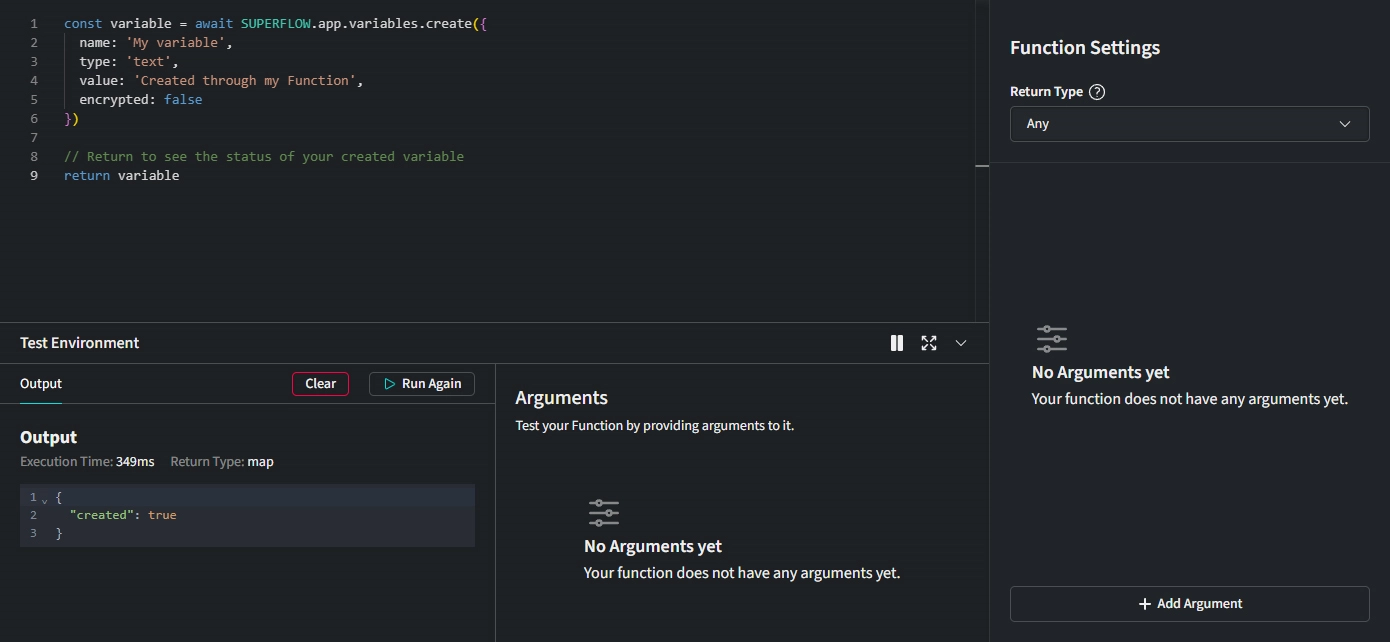 You can access, update, create and delete Project Variables from within your Functions.
Create Variable
If you want to create a new Variable, you can use the following code:
const variable = await SUPERFLOW.app.variables.create({
  name: 'My Variable',
  type: 'text',
  value: 'Created through my Function',
  encrypted: false
})

// Return to see the status of your created Variable
return variable
Example output:
{
  "app_id": "4323222-83da-3333-af4d-cc51cd4b0681",
  "id": "d64db8d9-3333-4946-2222-222222222",
  "workspace_id": "2333333-d44444b-4c4444-8296-344444442",
  "name": "My Variable",
  "value": "Created through my Function",
  "type": "text",
  "encrypted": false,
  "updated_at": "2025-03-02T17:35:41.699Z",
  "created_at": "2025-03-02T17:29:30.655Z"
}
In this example, a new Variable is created with the name My Variable, the value Created through my Function, and the type text. The encrypted property is set to false by default, but can be set to true if you want to encrypt the Variable value.
Update Variable by ID
You can update a Variable by ID with the following code:
const variable = await SUPERFLOW.app.variables.update('d64db8d9-3333-4946-2222-222222222', {
  value: 'New value',
  // Pass other properties to update if you want
})

// Return to see the status of your updated Variable
return variable
Example output:
{
  "app_id": "4323222-83da-3333-af4d-cc51cd4b0681",
  "id": "d64db8d9-3333-4946-2222-222222222",
  "workspace_id": "2333333-d44444b-4c4444-8296-344444442",
  "name": "My Variable",
  "value": "New value",
  "type": "text",
  "encrypted": false,
  "updated_at": "2025-03-02T17:35:41.699Z",
  "created_at": "2025-03-02T17:29:30.655Z"
}
In this example we updated the Variable with the ID d64db8d9-3333-4946-2222-222222222 and set its value to New value.
Update Variable by Name
You can update a Variable by name with the following code:
const variable = await SUPERFLOW.app.variables.updateByName('My Variable', {
  value: 'New value',
  // Pass other properties to update if you want
})

return variable
// Return to see the status of your updated Variable
Example output:
{
  "app_id": "4323222-83da-3333-af4d-cc51cd4b0681",
  "id": "d64db8d9-3333-4946-2222-222222222",
  "workspace_id": "2333333-d44444b-4c4444-8296-344444442",
  "name": "My Variable",
  "value": "New value",
  "type": "text",
  "encrypted": false,
  "updated_at": "2025-03-02T17:35:41.699Z",
  "created_at": "2025-03-02T17:29:30.655Z"
}
In this example we updated the Variable with the Name My Variable and set its value to New value.
Delete Variable
You can delete a Variable with the following code:
const variable = await SUPERFLOW.app.variables.delete('ffa12345-41b4-46ad-8b64-998c3002c6a0')
// Pass the variable id to delete it


return variable
// Return to see the deleted Variable
Example output:
{
  "app_id": "4323222-83da-3333-af4d-cc51cd4b0681",
  "id": "d64db8d9-3333-4946-2222-222222222",
  "workspace_id": "2333333-d44444b-4c4444-8296-344444442",
  "name": "My Variable",
  "value": "Created through my Function",
  "type": "text",
  "encrypted": false,
  "updated_at": "2025-03-02T17:35:41.699Z",
  "created_at": "2025-03-02T17:29:30.655Z"
}
Get Variable by ID
You can get a Variable by ID with the following code:
const variable = await SUPERFLOW.app.variables.get('d64db8d9-3333-4946-2222-222222222')
// Pass the Variable id to get specific Variable

return variable
// Return to see the Variable
Example output:
{
  "app_id": "4323222-83da-3333-af4d-cc51cd4b0681",
  "id": "d64db8d9-3333-4946-2222-222222222",
  "workspace_id": "2333333-d44444b-4c4444-8296-344444442",
  "name": "My Variable",
  "value": "New value",
  "type": "text",
  "encrypted": false,
  "updated_at": "2025-03-02T17:35:41.699Z",
  "created_at": "2025-03-02T17:29:30.655Z"
}
Get Variable by Name
You can get a Variable by name with the following code:
const variable = await SUPERFLOW.app.variables.getByName('My Variable')
// Pass the Variable name to get specific Variable

return variable
// Return to see the Variable
Example output:
{
  "app_id": "4323222-83da-3333-af4d-cc51cd4b0681",
  "id": "d64db8d9-3333-4946-2222-222222222",
  "workspace_id": "2333333-d44444b-4c4444-8296-344444442",
  "name": "My Variable",
  "value": "Created through my Function",
  "type": "text",
  "encrypted": false,
  "updated_at": "2025-03-02T17:35:41.699Z",
  "created_at": "2025-03-02T17:29:30.655Z"
}
List Variables
You can list all Variables with the following code:
const variables = await SUPERFLOW.app.variables.list()

return variables
// Return to see the Variables
Count Variables
You can count all Variables with the following code:
const count = await SUPERFLOW.app.variables.count()

return count
// Return to see the count
Example output:
{
  "total": 34
}
Search Variables
In some cases you will need to search for a specific Variable or a group of Variables. To do so use the following code:
const variables = await SUPERFLOW.app.variables.search('My Variable')
// Search query string that you want to search for

return variables
// Return to see the Variables
Example output:
[
  {
    "app_id": "4323222-83da-3333-af4d-cc51cd4b0681",
    "id": "d64db8d9-3333-4946-2222-222222222",
    "workspace_id": "2333333-d44444b-4c4444-8296-344444442",
    "name": "My Variable",
    "value": "Created through my Function",
    "type": "text",
    "encrypted": false,
    "updated_at": "2025-03-02T17:35:41.699Z",
    "created_at": "2025-03-02T17:29:30.655Z"
  },
  // Other Variables...
]